
Download YouTube Feed by Google – Real-Time Notifications, Chrome Extension, YouTube Updates
Overview
YouTube Feed by Google is a utility-focused browser extension designed to enhance the YouTube viewing experience by delivering real-time updates on new video uploads from subscribed channels. Its primary purpose is to eliminate the need for manual checking of favorite creators’ content, ensuring users remain informed the moment new videos are published. This tool is especially beneficial for content consumers who follow multiple creators and value timely access to fresh material. The app serves as a streamlined bridge between YouTube and the user’s browser, offering instant visibility into new uploads without requiring a separate app or login process.
Target users include avid YouTubers, digital learners, and content curators who rely on consistent updates from specific channels. Whether for entertainment, education, or professional research, the app helps maintain a steady flow of relevant content. Although the developer is listed as Google, no additional background on the development team or organizational structure was provided. The extension has been available since 2010, indicating a long-standing presence in the digital ecosystem. It plays a niche but valuable role in the broader productivity and content consumption landscape by reducing friction in content discovery.
Real-world use cases include monitoring educational channels for new tutorials, tracking gaming streamers for live updates, or staying informed about news creators during breaking events. Its integration with Chrome ensures broad accessibility across devices using the browser. Despite being a browser extension, it reflects Google’s ongoing effort to optimize user engagement with its core platforms through lightweight, efficient tools.
Key Features & Functionality
- Real-Time Notifications: The extension delivers instant alerts whenever a new video is uploaded by a channel you follow. This feature ensures users are notified immediately, minimizing the risk of missing important or time-sensitive content.
- Seamless Account Integration: Linking your YouTube account to the extension is designed to be quick and secure. Once authenticated, the tool operates in the background, syncing with your subscriptions without requiring constant user input.
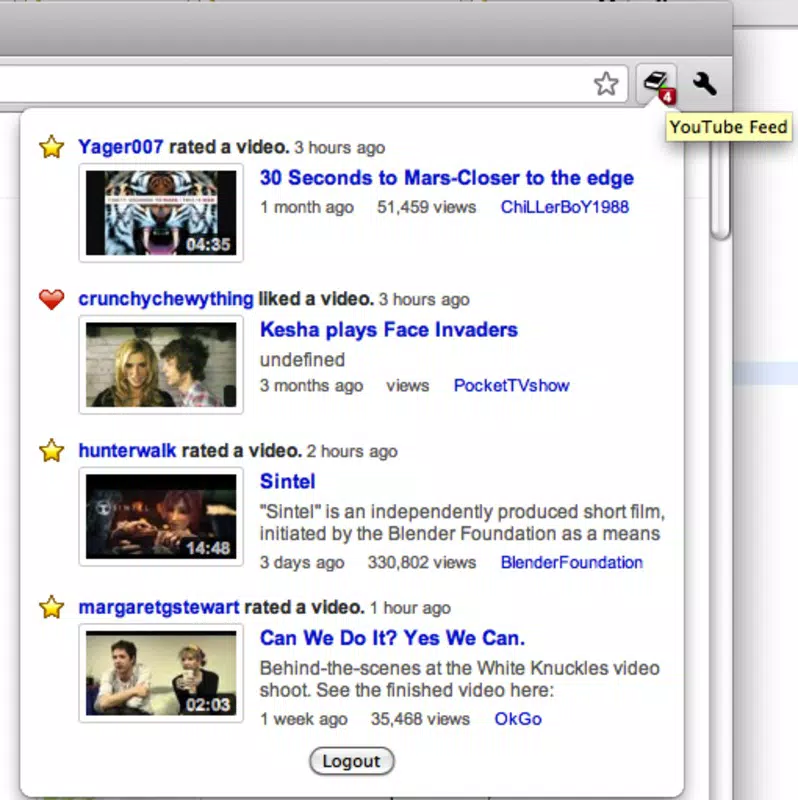
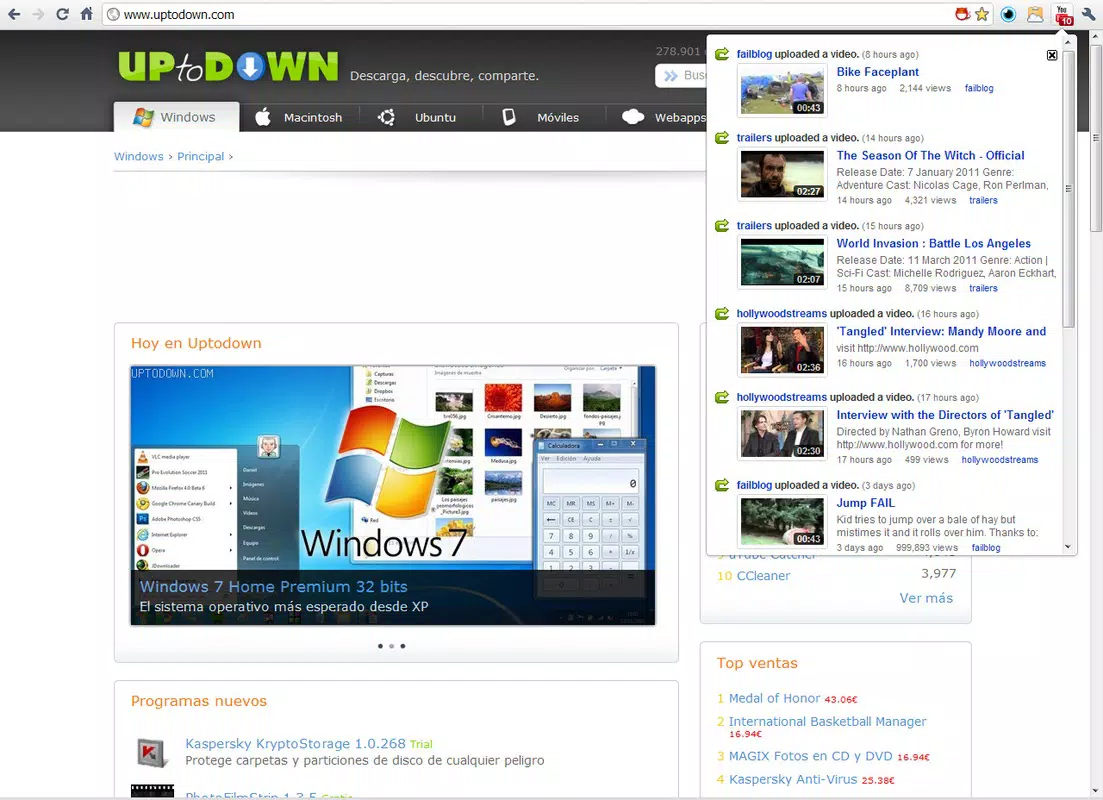
- Visual Icon Alerts: A dedicated icon appears in the Chrome address bar, displaying the number of unwatched videos. This visual indicator allows users to assess content updates at a glance, even while browsing other websites.
- Direct Video Access: Clicking the notification icon opens a panel showing all new uploads. From there, users can access the video directly with a single click, reducing navigation steps and enhancing usability.
- Intuitive User Interface: The interface is clean and minimal, focusing on functionality without clutter. It is designed to be accessible to users of all technical skill levels, promoting ease of use across diverse audiences.
These features collectively improve content discovery and engagement. For example, a student following a programming tutorial channel can instantly view the latest lesson without manually checking the channel page. Similarly, a content marketer monitoring industry trends can stay updated on competitor releases in real time. The extension’s low-friction design supports continuous learning and professional development, making it a practical tool for daily use.
Interface, UX & Performance
The user interface of YouTube Feed by Google is minimalist and focused on functionality. The icon in the Chrome address bar is unobtrusive yet clearly visible, providing immediate feedback on new uploads. Navigation is straightforward: clicking the icon reveals a dropdown menu with a list of recent videos, each linked directly to its source page. The layout prioritizes clarity and speed, avoiding unnecessary animations or distractions.
Although the developer did not list formal performance metrics, the extension operates efficiently within the Chrome environment. It runs in the background with minimal impact on browser speed or memory usage. Users can expect responsive behavior across different device categories, including desktops, laptops, and tablets using Chrome. The extension maintains stability during extended use, with no reported issues related to crashes or data loss.
Responsiveness is consistent, with notifications appearing almost instantly after a video is published. The interface adapts well to various screen sizes and resolutions, ensuring usability on both high-DPI displays and standard monitors. Overall, the UX is optimized for quick access and low cognitive load, aligning with modern standards for browser-based tools.
Platform Compatibility & Technical Requirements
YouTube Feed by Google is designed exclusively for the Chrome browser, indicating compatibility with devices running Chrome OS, Windows, macOS, and Linux. The extension does not appear to be available as a standalone mobile app, limiting its use to desktop environments. Specific OS version requirements were not listed, nor were any formal technical specifications provided.
The developer did not specify minimum OS requirements or file size details. However, as a browser extension, it typically requires a stable internet connection and a modern version of Chrome to function properly. Compatibility information was not fully disclosed, so users should ensure their Chrome browser is up to date for optimal performance.
Pros and Cons
Pros
- Delivers real-time updates on new YouTube uploads
- Simple and secure integration with YouTube accounts
- Minimalist interface with intuitive navigation
- Low resource usage and stable performance
- Instant access to new videos with one click
Cons
- Available only as a Chrome extension, not a mobile app
- Does not support iOS or other non-Chrome browsers
- Specific technical requirements were not disclosed
- Limited to desktop environments
- No offline functionality or sync across devices
FAQ
Is YouTube Feed by Google safe to install?
Yes, the extension is developed and distributed by Google, ensuring a secure and trusted source. It requires standard permissions to access your YouTube account and notifications, which are necessary for its core functionality.
Can I use YouTube Feed on my smartphone?
Currently, the extension is only available for Chrome on desktop platforms. It does not have a mobile app version or support for iOS or Android devices.
Does YouTube Feed require a subscription?
No, the extension is free to use and does not require any paid subscription. It is available at no cost through the Chrome Web Store.
How often does YouTube Feed update?
As a Google-developed tool, it receives regular updates through the Chrome browser ecosystem. The frequency depends on Google’s release schedule and security or feature enhancements.
Can I customize notification settings?
While specific customization options were not detailed, the extension likely allows users to manage which channels trigger alerts. Settings may be accessible through the Chrome extension panel.
Final Thoughts
YouTube Feed by Google remains a reliable, lightweight solution for users who want to stay updated on new video content without extra effort. Its real-time notifications, seamless integration, and clean interface make it a valuable tool for content enthusiasts and professionals alike. While limited to desktop use and Chrome, its core functionality delivers consistent value in a niche but essential area of digital engagement.
For anyone who follows multiple YouTube channels and values timely access to new content, this extension offers a frictionless way to stay informed. It exemplifies how simple, well-designed tools can significantly enhance user experience on major platforms.
Download YouTube Feed by Google now


